


Table of Contents
Switching from a generic @gmail.com to a professional address like info@yourdomain.co.ke is the fastest way to build trust with Kenyan clients. If you are already hosting with Novahost, Truehost, or Host Africa, or any other hosters, you likely have free email accounts waiting for you in your control panel.
Here is the 2026 step-by-step guide to setting up and using your professional business email.
Phase 1: Creating the Email in cPanel

Most Kenyan hosts use cPanel as their management dashboard. The process takes less than 2 minutes.
- Log in to cPanel: Usually, this is
yourdomain.co.ke/cpanelor found via your host’s client area. - Find “Email Accounts”: Scroll down to the Email section and click on Email Accounts.
- Click +Create: Look for the blue Create button.
- Fill in the Details:
- Domain: Select your domain from the dropdown.
- Username: Enter the prefix (e.g.,
info,sales, or your name). - Password: Use a strong password (or the Generate button). Copy this immediately.
- Storage Space: You can set a limit (e.g., 1GB) or select Unlimited (shared with your hosting quota).
- Hit Create: Your email is now active!

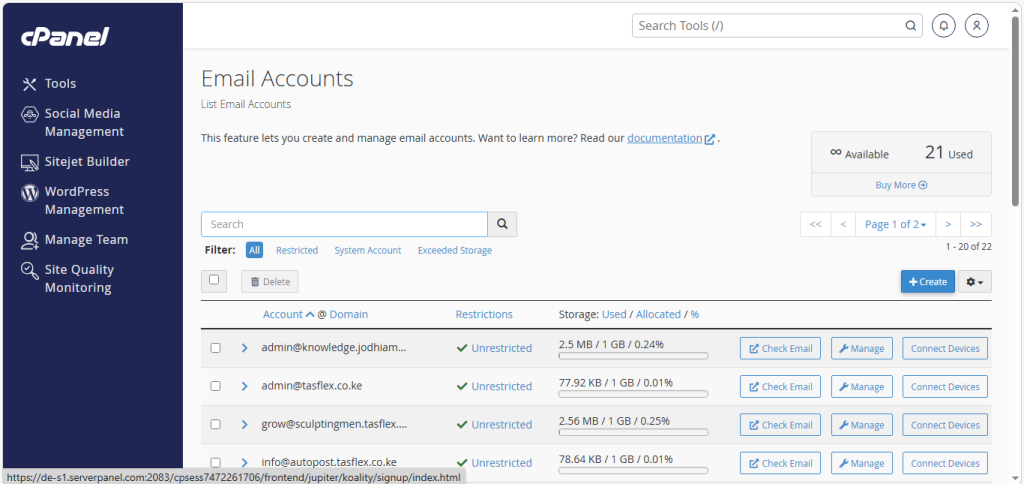
Phase 2: How to Access Your Mail
You have three main ways to read and send your business emails:
1. Webmail (The Quickest Way)

Go to yourdomain.co.ke/webmail in your browser. Log in with your full email address and the password you just created. You will usually use Roundcube as the interface, it looks and feels like a classic inbox.
2. Connect to Your Phone (Gmail App)

In 2026, many people prefer using the Gmail app for all their accounts.
- Open Gmail > Settings > Add account > Other.
- Enter your business email.
- Select IMAP.
- Incoming Server:
mail.yourdomain.co.ke(Port 993, SSL/TLS). - Outgoing Server (SMTP):
mail.yourdomain.co.ke(Port 465, SSL/TLS).

3. Desktop (Outlook or Apple Mail)

Use the same IMAP and SMTP settings mentioned above. Most modern hosts also provide an “Auto-config” file in cPanel under Connect Devices that sets this up for you automatically.
Phase 3: Pro Tips for Business Emails
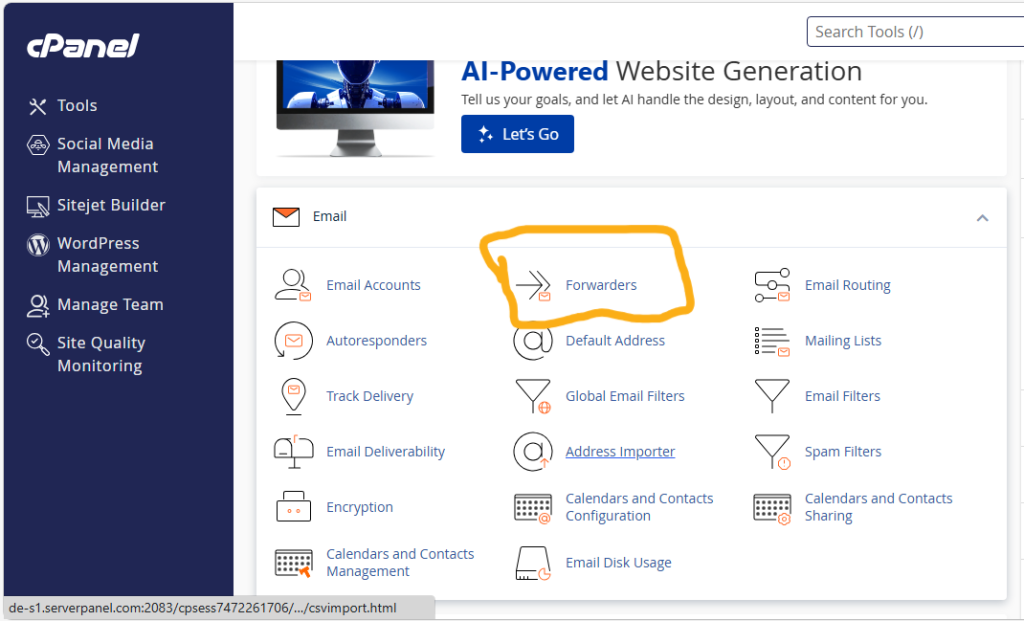

- Use Forwarders: If you don’t want to check a new inbox, go to Email > Forwarders in cPanel. You can make all mail sent to
info@yourdomain.co.keautomatically land in your personal Gmail. - Set an Autoresponder: If you are away or want to confirm you received a client’s inquiry, use the Autoresponders tool in cPanel to send an instant “Thank you, we will get back to you soon” message.
- Watch Your Storage: If you choose “Unlimited” storage, remember that your emails use the same space as your website files. If your inbox gets too full, your website might stop working!
Frequently Asked Questions (FAQs)
1. Can I use Gmail’s web version to send as my business email?
As of early 2026, Gmail has made it harder to “import” third-party accounts via POP3 on the web. The best way is to set up Email Forwarding (from cPanel to Gmail) so you receive mail, and then configure Gmail’s “Send Mail As” feature using your SMTP settings to reply.
2. Is my business email free?
If you have a hosting plan with Novahost or Truehost, you usually get a certain number of email accounts (often unlimited) for free as part of your package.
3. What is the difference between cPanel email and Google Workspace?
cPanel email is free with your hosting. Google Workspace (which gives you a business email inside the actual Gmail interface) costs about KSh 800 – 1,200 per user per month. For most startups, cPanel email is more than enough to start.
4. My emails are going to the recipient’s Spam folder. Why?
This is often due to missing “DNS Records.” In cPanel, go to Email Deliverability. Ensure that SPF, DKIM, and DMARC records are all marked as “Valid.” If they aren’t, click “Repair.”
5. Can I use M-Pesa to pay for my email hosting?
Yes! If you are using local hosts like Host Africa, you can pay your annual hosting bill via M-Pesa, which keeps your professional email active.
Need Help Setting Up Your Team’s Emails?
At Tasflex Designs, we ensure that every website we build comes with perfectly configured professional emails. We can even help you set up advanced features like “Catch-all” addresses and secure encryption.
Explore our Web Maintenance and Support services and let’s get your professional communication sorted.
How to create a business email on cPanel
This video provides a practical, visual guide to finding the email settings in your control panel and connecting them to your devices.